Assess
Review the current ColdFusion version, application code, Java requirements, dependencies, datasources and integrations.

Keep your existing ColdFusion applications reliable, secure and useful—or build something entirely new with the latest ColdFusion capabilities.
xByte provides ColdFusion code maintenance, application support, integrations, version upgrades, AI development and custom application creation.
Call 888-543-3302Many ColdFusion applications have supported critical business processes for years. They contain valuable workflows, customer data, integrations and institutional knowledge that cannot simply be replaced with an off-the-shelf product.

Correct bugs, improve existing code and keep your application aligned with changing business needs.

Move older applications to supported ColdFusion versions using a planned testing and deployment process.

Connect ColdFusion applications with APIs, databases, payment platforms and other business systems.

Create custom ColdFusion applications around workflows that generic software cannot adequately support.
Whether you need ongoing help with an existing application or a team for a new initiative, xByte can provide targeted ColdFusion development and support.
Review and update existing CFML, remove obsolete code, improve maintainability and address technical debt.
Investigate recurring errors, failed processes and unexpected application behavior to identify and correct the underlying cause.
Address inefficient application code, slow database queries, long-running requests and other performance bottlenecks.
Extend an existing application with new workflows, reports, administrative tools and user capabilities.
Review code and configuration for outdated practices, authentication weaknesses, insecure data handling and other risks.
Keep your application useful as users, business processes, dependencies and technical requirements change.
Running an older ColdFusion version can limit security updates, software compatibility and access to modern platform features. An upgrade should address both the ColdFusion server and the application code running on it.
Assess
Review the current ColdFusion version, application code, Java requirements, dependencies, datasources and integrations.
Build a Test Environment
Install the target ColdFusion version and migrate a working copy of the application into an isolated testing environment.
Correct & Test
Identify deprecated features, incompatibilities and application errors, then test critical workflows and integrations.
Deploy & Support
Move the approved application into production, validate the deployment and address any post-launch issues.

If your organization is still running ColdFusion 2021 in production, you are now operating on unsupported software. Applications may still function normally, but from a security, compliance, and operational risk perspective, the environment has fundamentally shifted.
ColdFusion 2025 Update 8 introduced native AI services that allow modern AI capabilities to be incorporated directly into CFML applications. This creates new opportunities to improve existing ColdFusion systems without replacing the application or creating an entirely separate technology stack.
xByte can help identify practical AI use cases, connect the appropriate AI services and integrate those capabilities with your existing application logic, users and data.
 AI ASSISTANTS
Add conversational assistants that help users find information, complete tasks or navigate application workflows.
 DOCUMENT Q&A
Use retrieval-augmented generation to answer questions using approved documents and organization-specific content.
 SEMANTIC SEARCH
Use vector search to retrieve information by meaning and similarity instead of relying only on exact keyword matches.
 CONTENT GENERATION
Help approved users draft, summarize, classify, translate or transform content inside existing workflows.
 WORKFLOW AUTOMATION
Combine AI reasoning with controlled application tools and business rules to assist with multi-step processes.
 ENTERPRISE INTEGRATIONS
Use Model Context Protocol to connect AI services with approved ColdFusion functions and external systems.
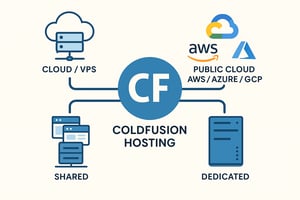
ColdFusion hosting is very different from generic web hosting because Adobe ColdFusion applications rely on much more than just a web server.

Common areas to investigate include errors in jvm.config, special JVM arguments, Java compatibility, the CFStart utility and an unavailable Tomcat service.
The visible error is not always the root cause. Recent updates, configuration changes, file permissions and service-account access may all need to be reviewed.

Overview of how xByte Cloud infrastructure supports organizations working toward HIPAA compliance, along with important considerations regarding responsibilities between the infrastructure provider and the environment owner.